Brooke Hadden
Brooke Hadden
Brooke Hadden
I'm a UX Designer who enjoys problem solving with data, evidence and creativity.


Who's Cooking?
Family meal planner application for mobile devices.
Who's Cooking? is a UX Case Study concept app created during my Google UX Design Certificate course through Coursera.
Basic Info
Role: Sole UX Designer
Tools: Canva, Figma, Paper & Pencil
Overview
Have you ever arrived home only to find you nor your partner had planned dinner? You thought they were going to take care of it, and they thought the same. Never again! This app connects households in a digital environment in effort to simplify meal responsibilities. The main function allows different users connect and utilize one cohesive calendar.
Design Process
With a focus on UX design, the steps I covered in my design process include user personas, user flows, sketching, wireframing, and prototyping. If this were a real app, a usability study would take place after prototyping to determine and fix user pain points.

The Problem
How can a household effectively communicate meal preparation responsibilities in a digital environment?
Product Goals
-
Design an app where multiple users in a household can access a communal calendar
-
Allow users to simplify meal responsibilities
-
App will be assistive technology capable
-
Integrate multiple language options
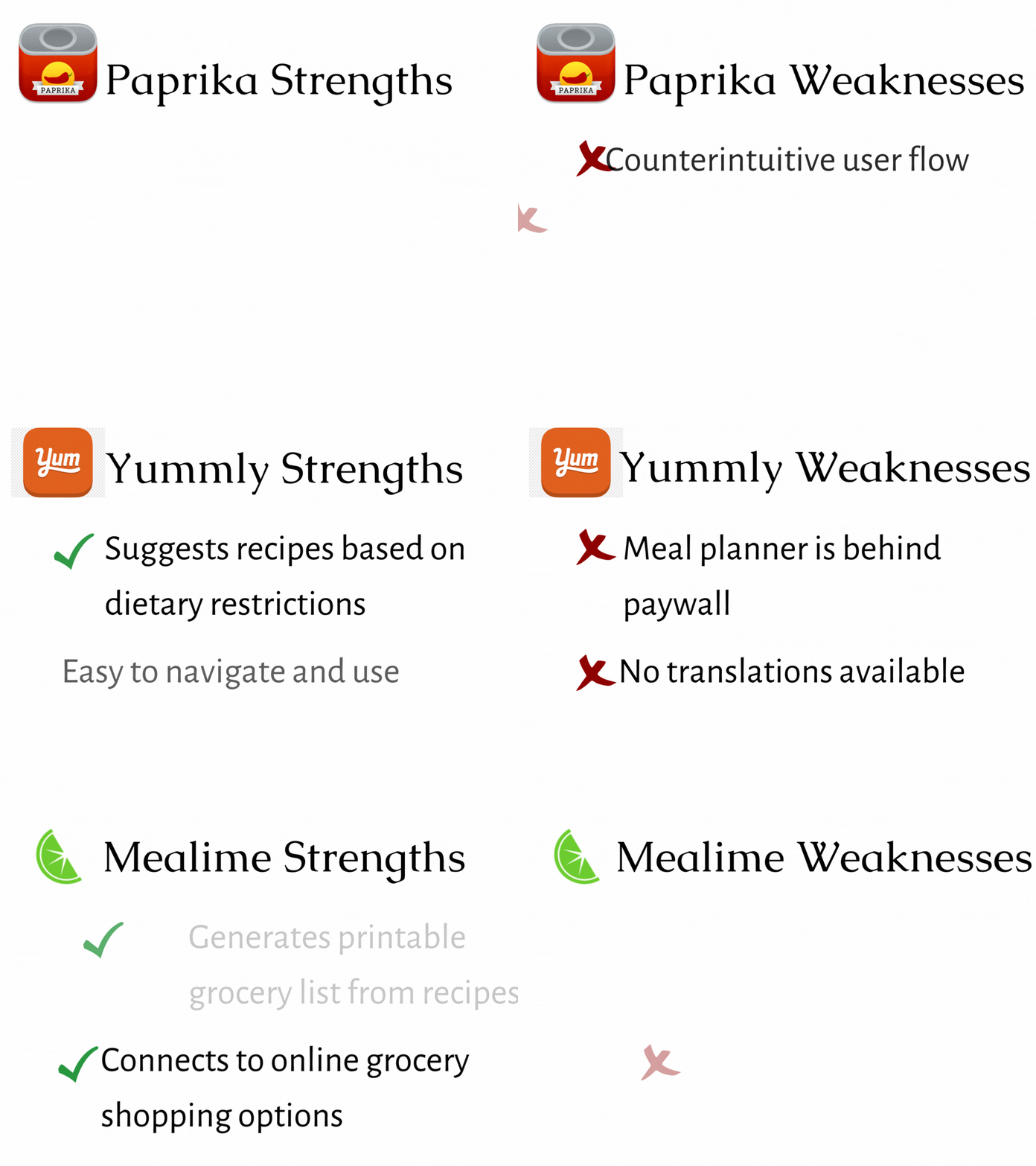
Competition Analysis
The competitor analysis revealed missed opportunities such as connecting with other household users, providing assistive technologies, and color coding the joint calendar for easy viewing.
Interviews
Potential users with varying demographics were interviewed. I asked questions focused on users' experiences with meal planning in their household and what would improve their planning process. I analyzed my users' answers by arranging them into an affinity map to gain insights. In the interviews, I learned that meal responsibility miscommunications result in fast food purchases or arguments. One user mentioned their color coded hand written calendar in their home. This comment inspired the color coded aspect in the joint calendar on the app.
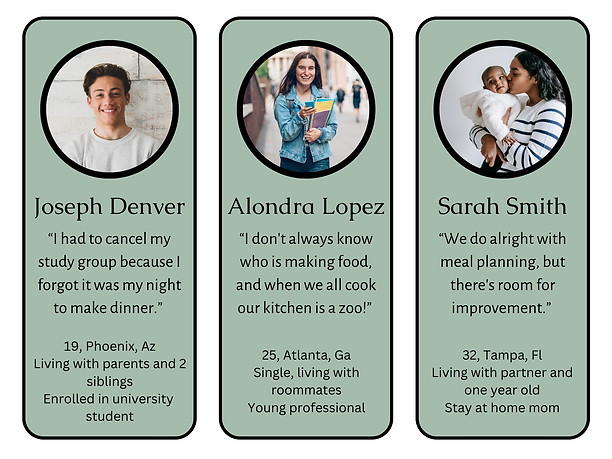
User Personas
Based on user research, I created user personas with different perspectives. The three personas include a young adult who still lives at home, a young professional who lives with roommates, and a head of house partner.
.png)
User Flow Diagram
In a perfect world, this app would accompany an existing product/platform that offered the ability to find and save recipes. Based on user research and competitor analysis, it would be advantageous to include a grocery list that is editable and generated according to the recipes planned on the upcoming week's calendar.
.png)

Wireframes & Prototypes
I utilized paper and pencil to create low-fidelity wireframes. Later I converted sketches into mid-fidelity wireframes and a prototype with Figma. I focused on the homepage in the wireframe example.

UI Design
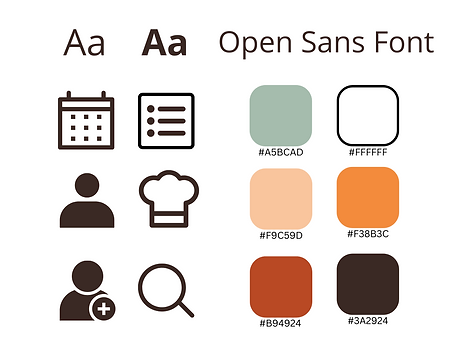
Style Guide
I used real images and pops of color to engage users and get them excited about planning their meals. I wanted the images to be simple and inspirational, to demonstrate to users that possibilities were attainable.
Colors
The app’s main colors are shades of orange with a complementary sage tone. Orange is stimulates, energizes and evokes appetite. In addition, I made sure there was high contrast between text and its background to make an inclusive design for vision impaired users.
Typography
For the typography, I used Open Sans, a sans serif font, to ensure legibility.
Icons
I kept the icons clean and simple, and for the most part, I used universal icons. Universal icons assist users with a language barrier.
.png)
.png)
Final Showcase
.png)
Next Steps & Notes
I found that the most important part of the process was research through interviews. Had this app been for a client, the next step would be crucial, usability testing . Click Here for UX Research Study Plan. Using my findings from the tests, I could create an affinity map to analyze the results and a rainbow spreadsheet to map out and prioritize the errors that occurred during testing. This data would be used to fine tune the app prior to launch.
It is vital to increase the accessibility of the app, especially for users who utilize assistive technologies and users who know English as a second language. My app was geared towards anyone living in a household with other individuals responsible for meal planning. Therefore, users who may be less tech-savvy, have a different primary language, or impairment need to have their needs addressed as well.